Account & billing#
The Account page groups three tabs: Profile, Billing, and Usage. Switch tabs with the segmented control at the top.
 Fig. F-1: The three Account tabs (Profile, Billing, Usage).
Profile#
The Profile tab holds personal details and account-wide actions.
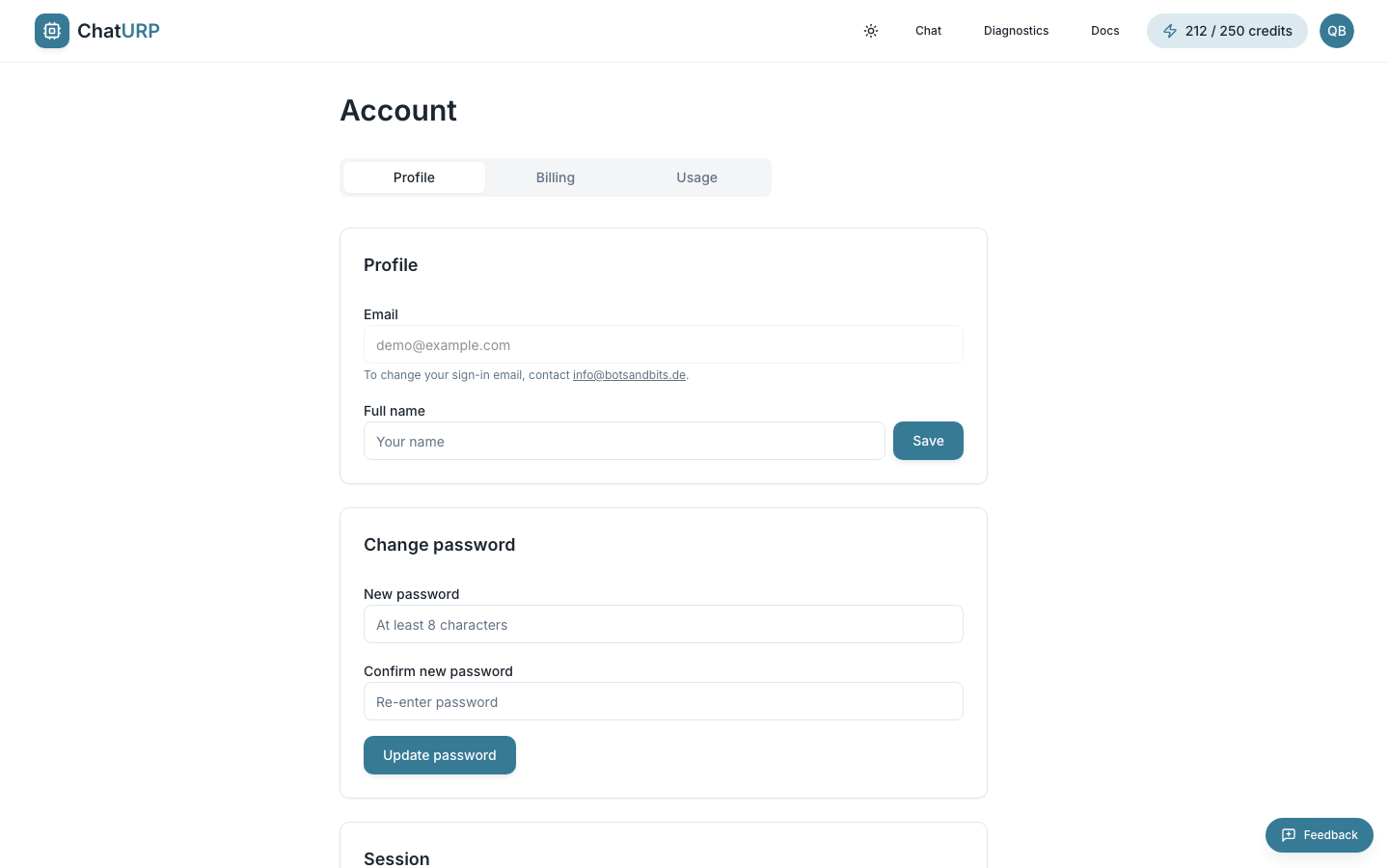 Fig. F-2: Profile tab — the name and password cards.
 Sign out, Download my data (JSON) and the danger zone are further down the same page.
- Email is shown for reference and cannot be edited inline. To change your sign-in email, use the contact form or write to [email protected].
- Full name is editable. Type a new value and click
Save. - Change password has two fields —
New passwordandConfirm new password— and a minimum of 8 characters. ClickUpdate password; the two must match, and you stay signed in. - Sign out ends the current session and returns you to the landing page.
- Download my data (JSON) exports everything we hold about you: profile, conversations, messages, generated programs, the feedback you have sent, and the request logs behind your generations. This covers your right of data portability under GDPR Art. 20. You can run it once a minute. Billing and payment records are held by Paddle as merchant of record and are requested through the billing portal instead.
- Delete account in the danger zone permanently removes your data. If you have an active subscription, you must cancel it first — otherwise your card would keep being charged for an inaccessible service. A paused subscription also blocks deletion, and for a stronger reason: a pause can be resumed and start charging a card that belongs to an account that no longer exists. Cancel it before deleting.
Choosing a plan#
ChatURP has four tiers:
| Free | Starter | Pro | Enterprise | |
|---|---|---|---|---|
| Price (incl. VAT) | — | €34.51 / month | €58.31 / month | coming soon |
| Credits | 30 once, at signup | 100 / month | 250 / month | 1000 / month |
| Program generation & editing | ✅ | ✅ | ✅ | ✅ |
| Diagnostics (upload & browse) | ✅ | ✅ | ✅ | ✅ |
| Flowchart view & PDF export | — | ✅ | ✅ | ✅ |
| Performance reports | — | — | ✅ | ✅ |
| AI log analysis | — | — | ✅ | ✅ |
Two things are easy to mix up: the flowchart view is included on every paid plan, while Performance reports and AI log analysis are Pro and above only. Uploading and browsing a support file in Diagnostics is available on every tier, including free.
The free tier is a one-time allowance of 30 credits and needs no credit card. It does not reset monthly — once those 30 are spent, you either subscribe or stop. Starter and Pro credits refresh with each monthly renewal, and unused credits do not roll over into the next month.
What spends a credit:
- 1 — each AI generation or edit of a program.
- 1 — each program import.
- 5 — each new support-file upload in Diagnostics.
- 20 — each Performance report (Pro and above).
- 3, 5 or 7 — each AI log analysis in Diagnostics (Pro and above), by how many log streams the run actually reads: 3 for one, 5 for two, 7 for all three.
Exporting is free. So is re-opening a program, or a Diagnostics file, report or AI analysis you have already paid for. Browsing a support file's logs and telemetry on screen costs nothing on its own.
For the live prices, see the pricing page.
Subscribing#
When you are on the free tier, the Billing tab shows an Upgrade your plan card with the current Starter and Pro prices and the launch discount code.
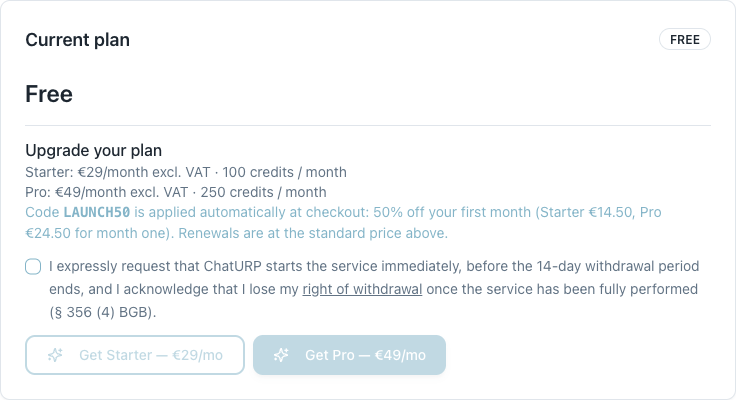 Fig. F-3: The free-tier Billing card — both plans, the automatic discount, and the § 356 (4) BGB consent checkbox that unlocks the buttons.
To subscribe:
- Tick the consent checkbox. This is the express request that the paid service starts immediately, and the acknowledgement that you lose the 14-day right of withdrawal once the service has been fully performed (§ 356 (4) BGB). The purchase buttons stay disabled until you do.
- Click
Get StarterorGet Pro. The checkout overlay opens in the same page. - Complete payment. Your account is upgraded as soon as the payment is confirmed — usually a few seconds, and the page updates by itself.
About LAUNCH50. While the promotion lasts, the code is applied automatically at checkout — you do not type it in. It takes 50 % off your first billing period only: month one is €17.26 for Starter or €29.16 for Pro (incl. VAT), and every renewal after that is charged at the standard €34.51 or €58.31 per month incl. VAT.
Managing your subscription#
Once a paid plan is active, the Billing tab swaps the upgrade card for a summary of what you are on and what happens next.
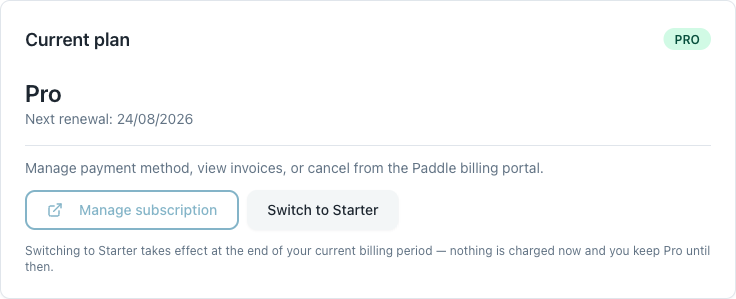 Fig. F-4: An active Pro subscription — renewal date, the billing portal, and the downgrade path.
- Current plan shows the tier name and the next renewal date.
- A plan badge in the card header names the plan you are entitled to right now —
Free,Starter,ProorEnterprise. It tracks your plan, not your payment state, so it keeps sayingProwhile a cancellation or a downgrade is merely scheduled. - Anything unusual about your subscription is written out underneath the plan name, as a sentence rather than a badge — but the five notices are not alike, so it is worth knowing which is which. A scheduled cancellation and a scheduled downgrade each get a highlighted box carrying the date it takes effect and the button that calls it off (
Resume subscriptionandKeep Prorespectively). A failed payment and a paused subscription are explanations only: no date, and no button of their own — both point you further down the card toManage subscription, and the paused one also asks you to contact support. A fifth appears only after a paused subscription has been resumed: "Your subscription is being reactivated" — paid features and monthly credits come back with your next payment, because nobody has paid for the gap. Manage subscriptionopens our payment provider's (Paddle) billing portal in a new tab. Use it to update your payment method, download invoices, or cancel.- Plan switches happen here in the app, not in the portal — the portal has no plan-change screen. Depending on your tier you will see
Upgrade to ProorSwitch to Starter. - Switches are rate-limited to one a minute. If you have just changed plans, the next switch is refused with "You just changed plans — give it a minute before switching again." Opening the confirmation dialog to look at the numbers is never rate-limited; only the switch itself is.
Behind the scenes: activating a plan sets your renewal date and grants your monthly credits, and each successful renewal payment refreshes your credit balance and resets your monthly usage.
Upgrading#
Upgrading from Starter to Pro is immediate. Click Upgrade to Pro on the Billing tab.
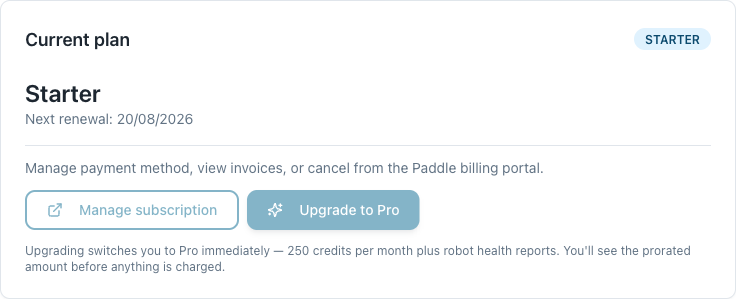 Fig. F-5: Starter, with the in-app upgrade path.
Before anything is charged, a confirmation dialog shows you the real numbers, fetched live from Paddle for your specific subscription:
- The exact amount you will be charged now — the prorated difference for the remainder of the current billing period, including VAT. You are not charged a fresh full month.
- What you pay from the next cycle onward, and the date of that next bill.
- Exactly what happens to your credits, written out as "your balance goes from X to Y".
- A § 356 (4) BGB consent checkbox, because this charge takes money immediately.
Confirm upgradestays disabled until it is ticked.
Nothing is charged until you confirm. If you close the dialog, no change is made.
What happens to your credit balance. An upgrade tops your balance up by the difference between the two plans' monthly allowances — Pro's 250 minus Starter's 100, so +150 credits — added to whatever you have left. It is a top-up, not a reset to 250. If you had 40 credits left you will have 190, not 250. Your balance then refills to the full 250 at your next renewal. The top-up is granted once per billing period: if you upgrade, switch back to Starter, and upgrade again inside the same month, the second upgrade adds nothing, and the dialog says so plainly rather than promising credits that will not arrive.
Downgrading#
Switching from Pro down to Starter takes effect at the end of your current billing period, never immediately. Click Switch to Starter and confirm.
- Nothing is charged, and nothing is refunded for the remainder of the period. You have already paid for Pro through to your renewal date, so you keep it — that is the reason there is nothing to refund rather than an unwillingness to give one.
- You keep Pro's features and your current credit balance until the switch date. Your credits are not clamped down to Starter's 100 in the meantime.
- On your renewal date the switch applies: you are billed €34.51 (incl. VAT), and your allowance becomes Starter's 100 credits per month.
- Performance reports and AI log analysis stop on that date, since both are Pro-only. The flowchart view continues — it is on every paid plan.
While the switch is scheduled, the Billing tab tells you so and offers a way out.
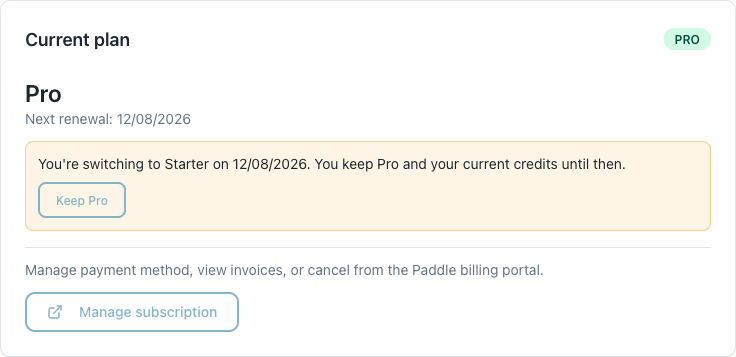 Fig. F-6: A scheduled downgrade, with the one-click
 Keep Pro undo.
To cancel a scheduled downgrade, click Keep Pro. Nothing is charged, no credits move, and the switch is called off — you carry on exactly as you were. You can do this at any point before the switch date.
Cancelling#
Cancelling is done in the billing portal: Account → Billing → Manage subscription → cancel.
Your subscription does not stop the moment you click. It is scheduled to end at your renewal date, and in the normal case nothing changes until then:
- You keep your plan's features and your remaining credits for the rest of the period you have paid for. The exception is a subscription whose payment is already failing — a cancellation scheduled during dunning may find your plan and credits already reduced, and the notice on the card says so instead of promising an untouched balance.
- The Billing tab shows the end date. If we cannot state that date accurately it says "at the end of this billing period" rather than printing one we are not sure of, so you may see the wording without a date.
- Plan changes are paused while a cancellation is scheduled. You cannot upgrade or downgrade until you resume — this avoids charging you a prorated upgrade on a subscription that is about to disappear.
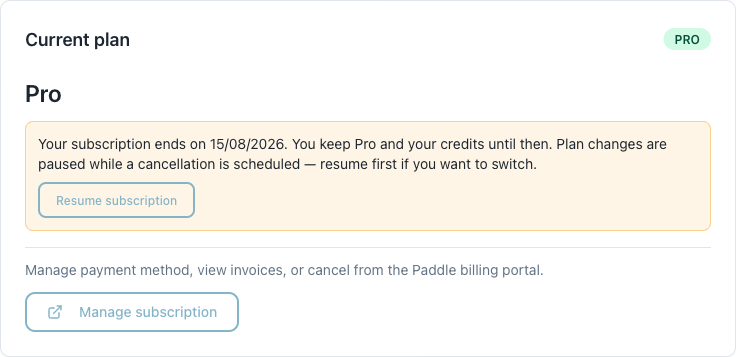 Fig. F-7: A scheduled cancellation, with the
 Resume subscription button.
When the cancellation takes effect, your account returns to the free tier and any remaining credit balance is set to zero. Free-tier credits are a one-time signup allowance, so cancelling does not hand you a fresh 30. Your programs, conversations and account itself are untouched — you can still sign in, open and export everything you have made.
You can delete your account without waiting for the cancellation to finish: once it is scheduled, deletion is available straight away.
Cancelling without logging in. If you cannot get into your account, use the cancellation form at /kuendigung — the statutory § 312k BGB cancellation route, also named in /terms § 8.3. It takes your name, email and contract, lets you choose an ordinary or extraordinary cancellation, and confirms receipt by email with a date. It is handled by support rather than applied automatically, so the in-app route above is still the faster one when you can sign in.
Resuming a cancellation#
Changed your mind? Open Account → Billing. While a cancellation is scheduled you will see the end date and a Resume subscription button.
Clicking it removes the scheduled cancellation. Nothing is charged — your subscription simply carries on and renews as normal on its usual date, at its usual price. Your credits and plan are unaffected, because they never went anywhere.
Two things worth knowing:
- This button is the only way back. The billing portal can schedule a cancellation but offers no way to undo one, so resuming has to happen here in the app.
- It works only while the cancellation is still pending. Once the end date passes and the subscription has actually ended, there is nothing left to resume and you subscribe again through normal checkout.
Once you have resumed, you can switch plans again.
When a payment fails#
If a renewal payment does not go through, the Billing tab shows a red notice reading "Your last payment failed - update your payment method below to keep your subscription." We email you as well.
- Your card is retried automatically over the following days. In the normal case there is nothing for you to do but make sure the card on file is valid — use
Manage subscriptionto update it. - Your credits are not touched by the failure itself, and your plan's features stay available during the retry window.
- Plan changes are refused while a payment is overdue. Settle the balance first, then switch.
- One exception on credits: if you already had a downgrade scheduled and the renewal that was meant to apply it fails, the downgrade is applied at that point — your tier drops to the lower plan and your balance is capped at that plan's allowance. It is only ever capped, never raised: if you were on Pro with 20 credits left you keep 20, not Starter's 100. The period at the higher tier was never paid for, so neither the tier nor a fresh allowance continues for free.
If retries are exhausted and the balance is never settled, we may suspend access until it is. Statutory remedies are unaffected — see /terms § 6.7.
Pausing. We do not offer pausing a subscription. If one somehow ends up paused, paid features and monthly credits stop being available immediately. Two separate things then have to happen, which is why the card offers both a button and a support address:
- The subscription itself can be resumed (or cancelled) at our payment provider, via
Manage subscription. - Your entitlement — the tier and the monthly credits — only comes back with your next successful payment, because no one has paid for the intervening period. Once the subscription is resumed the card says so ("Your subscription is being reactivated") until that payment lands. If you need access before then, contact support and we will reinstate it by hand.
Usage & credits#
The Usage tab shows how much of your current allowance you have used and lists your most recent generations.
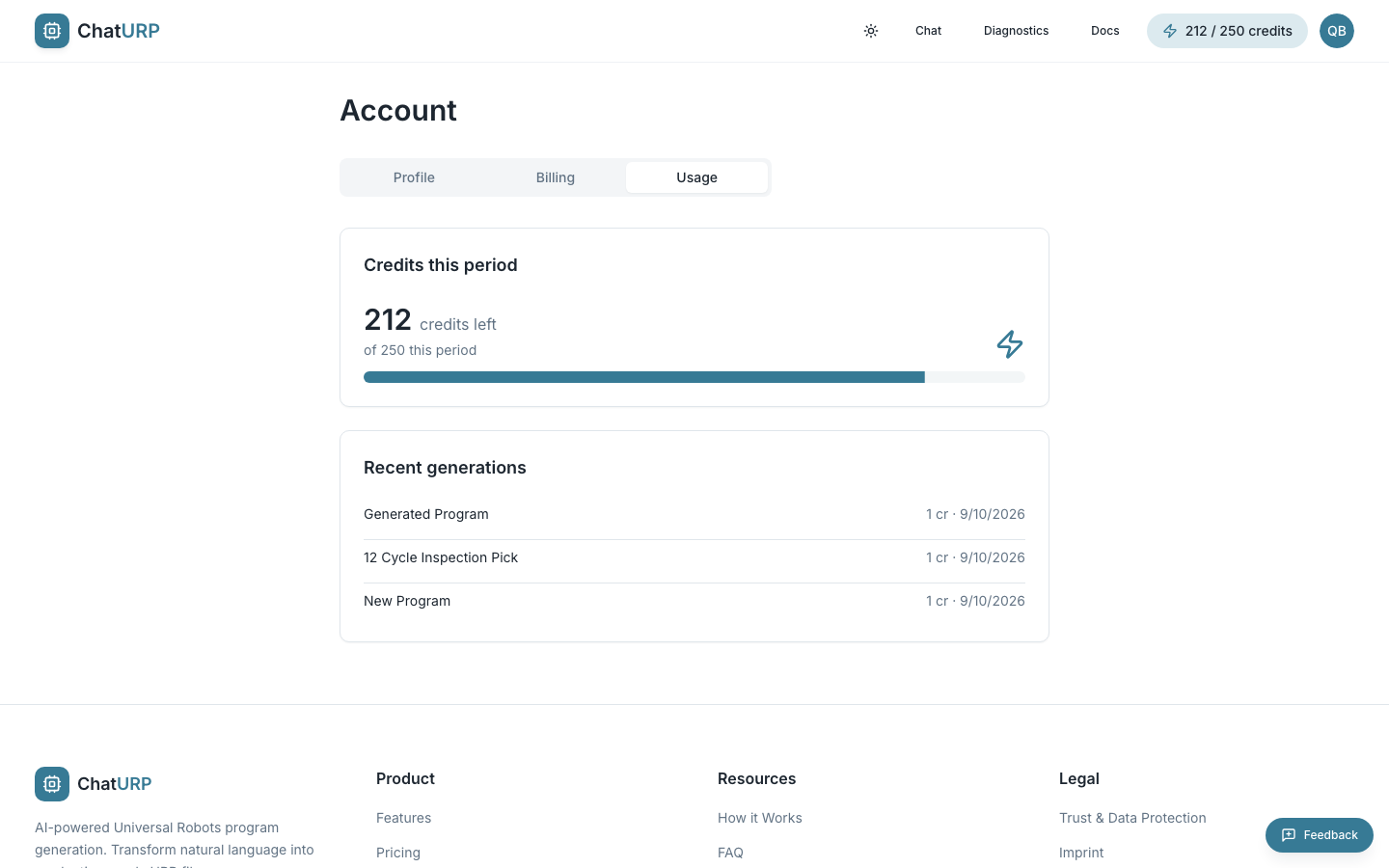 Fig. F-8: Usage tab — remaining credits, the balance bar, and recent generations. Shown here on Pro.
- Credits left is your current balance.
- The bar shows how much of your allowance is still there — 30 one-time credits on the free tier, 100 per month on Starter, 250 per month on Pro. It tracks your remaining balance rather than a "used" count, so running low reads as a near-empty bar. On a paid plan the card is headed "Credits this period"; on the free tier, where nothing refills, it reads "Credits remaining".
- Recent generations lists the last 10 successful generation turns with the program name, credits used, and date.
This list is not a full spend ledger. It shows successful generation turns only. Turns where the AI simply answered your question, program imports, and everything you spend in Diagnostics (uploads, Performance reports, AI log analyses) are left out, even though several of those cost credits. The Credits left figure above is the complete picture — it always reflects every charge.
See Choosing a plan for what each action costs.
Starter and Pro credits are a hard monthly cap, not a soft one — there is no overage billing and no way to buy more mid-month. If you use your full allowance before your renewal date, generations pause with a limit-reached notice until the balance refreshes at renewal. You are not charged extra. On Pro and Enterprise the notice sells you nothing; on Starter it also offers Pro, since Starter is not the top tier.
When you run out#
When a generation is refused for lack of credits, the chat opens a dialog headed "You've used all your credits". It quotes both paid plans — Starter as the entry point and Pro as the step up — and states that LAUNCH50 is applied automatically at checkout for the first month, with renewals at the standard price. Upgrade now takes you to the Billing tab so you can pick one and subscribe. Maybe later closes it; you can still browse and export existing programs, but no new generations will run until your credits top up.
If you are on a paid plan and have used your full monthly allowance, you see a different dialog — "You've hit your monthly credit limit", which names your allowance and the date your balance resets. Nothing is wrong with your subscription, so there is nothing to buy: the only button is Got it. The one exception is Starter, which is not the top tier and therefore also gets an Upgrade to Pro button quoting Pro's 250 credits a month.
There is a third case. If your subscription is paused, the dialog says so instead of selling you anything — a second plan cannot lift a pause, and checkout would refuse it. Go to Billing takes you to the card that explains the way out.
Refunds#
Cancellations are self-service from this page. Refunds, where eligible, are processed by our payment provider. The full commercial process and the EU 14-day right of withdrawal are documented at /refund and /terms.
A refund and a chargeback are not the same thing here. A refund we issue is a goodwill or support outcome and does not touch your account: your plan, your credits and your programs stay exactly as they were. A chargeback — a payment you dispute with your bank or card issuer — revokes access immediately: the account drops to the free tier and the credit balance is set to zero. If something has gone wrong with a payment, contact us first; a refund costs you nothing, a chargeback costs you your account access.
Billing FAQ#
Why didn't my credits reset to 250 when I upgraded to Pro? Because an upgrade is a top-up, not a reset. You get the difference between the two plans' monthly allowances — 250 minus Starter's 100, so +150 credits — added to whatever balance you had. Upgrade with 40 credits left and you land on 190, not 250. Your balance does refill to the full 250 at your next renewal. See Upgrading.
Can I upgrade twice in one month to get the credits twice? No. The top-up is granted at most once per billing period, and the latch only clears at your next renewal — so a second upgrade inside the same period adds nothing, however you get there. The confirmation dialog says so before you confirm rather than promising credits that will not arrive.
Why does an upgrade cost less than a full month? It is prorated — you only pay the difference between the two plans for the days remaining in the current period. The exact amount, including VAT, is shown before you confirm.
Why don't I get a refund when I downgrade? Because you keep what you paid for. The downgrade takes effect at the end of the period you have already funded, and until then you keep the higher plan's features and your full credit balance. There is nothing unused to refund. See Downgrading.
Can I cancel a downgrade I scheduled by mistake? Yes — click Keep Pro on the Billing tab any time before the switch date. Nothing is charged and no credits move.
Why is the Upgrade to Pro button missing? A scheduled cancellation is the only thing that hides it — plan changes are paused until you resume, so click Resume subscription first and then switch. A failed payment does not hide the button, but it does block the switch: the server refuses it while your account is overdue, so settle the balance first.
Will my card be charged after cancellation? No. Cancel from Manage subscription; billing stops at the end of the current period.
I cancelled — when do my plan's features stop? At the end of the current billing period. The Billing tab shows the exact date, and your credits stay usable until then.
What happens to my credits when the cancellation takes effect? Your remaining balance is set to zero and your account returns to the free tier. The free tier's 30 credits are a one-time signup allowance, so cancelling does not grant a fresh batch. Your programs and conversations remain, and you can still open and export them.
I cancelled but changed my mind. Open Account → Billing. While a cancellation is scheduled you will see the end date and a Resume subscription button, which removes it at no charge. This is the only way to undo a cancellation — the billing portal cannot. See Resuming a cancellation.
Do unused credits roll over to next month? No. Each renewal sets your balance to the plan's monthly allowance; anything left over is not carried forward.
Is LAUNCH50 an ongoing discount? No — it halves your first billing period only. From the second month on you pay the standard €34.51 (Starter) or €58.31 (Pro) incl. VAT.
My payment failed. We retry automatically for several days and email you. Your plan's features remain active during the retry window and your credits are untouched — unless you had a downgrade scheduled, in which case it is applied then. See When a payment fails.
Can I pause my subscription instead of cancelling? No, we do not offer pausing. If a subscription does end up paused, paid features and credits stop and it has to be reinstated by hand — contact support. A paused subscription also blocks account deletion, because a pause can be resumed and start billing again.
I can't sign in — how do I cancel? Use the cancellation form at /kuendigung. It is the statutory § 312k BGB route, needs no login, and confirms receipt with a date. See Cancelling.
Why isn't everything I paid for in the Usage list? Because that list shows generations only. Imports, question-and-answer turns and everything you spend in Diagnostics are charged but not listed there; the credit balance above it is the complete figure. See Usage & credits.
Where are my invoices? Inside the billing portal opened from Manage subscription.
Can I delete my account while subscribed? Not while a plan is still live and billing — cancel first, or your card would keep being charged for an account you can no longer reach. You do not have to wait for the cancellation to complete: once it is scheduled, deletion is available straight away. A paused subscription is the one case where that shortcut does not apply — it has to be cancelled outright first, because a pause can resume and bill again.
Does using Diagnostics cost credits? Yes — 5 credits per new support-file upload, 20 per Performance report, and 3, 5 or 7 per AI log analysis depending on how many log streams the run reads. Reports and AI analyses also require a Pro subscription; uploading and browsing does not. Re-opening a file, report or analysis you have already paid for is free. See /docs/diagnostics.